Introduction
This article will walk you through the steps necessary to deploy honecomb to your kubernetes cluster using fluxcd helm controller. I chose honeycomb.io mainly because I've heard so much about how great of an observability tool it is in blogs and podcasts. After hearing from their CEO in many different podcasts from Screaming In the Cloud, I fell in love with them and their culture. Also, I love honey, that has to count for something right? Now, for my use in a homelab for learning I have to deal with the free plan. It comes with 20 million events and 2 alerts. Not much, but you get what you pay for.
Pre-requisites
- Kubernetes cluster
- fluxcd https://fluxcd.io/flux/get-started/
Repo Structure
In your flux repo that you've configured when installing flux we're going to have a structure like so. We're following the github template here https://github.com/fluxcd/flux2-kustomize-helm-example/blob/main/clusters/staging/infrastructure.yaml. I like this directory structure because it separates the controllers from the configuration, we'll also have a directory for our apps a separate one for their configuration as well. This organization will help as our cluster becomes more complex.
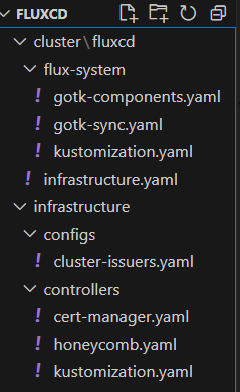
./flux-system/infrastructure.yaml:
This yaml will add our infra-controllers and infra-configs kustomizations point to the corresponding directories under ./infrastructure. There is also a patch to the
---
apiVersion: kustomize.toolkit.fluxcd.io/v1
kind: Kustomization
metadata:
  name: infra-controllers
  namespace: flux-system
spec:
  interval: 1h
  retryInterval: 1m
  timeout: 5m
  sourceRef:
    kind: GitRepository
    name: flux-system
  path: ./infrastructure/controllers
  prune: true
  wait: true
---
apiVersion: kustomize.toolkit.fluxcd.io/v1
kind: Kustomization
metadata:
  name: infra-configs
  namespace: flux-system
spec:
  dependsOn:
    - name: infra-controllers
  interval: 1h
  retryInterval: 1m
  timeout: 5m
  sourceRef:
    kind: GitRepository
    name: flux-system
  path: ./infrastructure/configs
  prune: true
  patches:
    - patch: |
        - op: replace
          path: /spec/acme/server
          value: https://acme-staging-v02.api.letsencrypt.org/directory
      target:
        kind: ClusterIssuer
        name: letsencrypt
./infrastructure/controllers/kustomization.yaml
Pointers to the yamls to configure corresponding resources.
apiVersion: kustomize.config.k8s.io/v1beta1
kind: Kustomization
resources:
  - cert-manager.yaml
  - honeycomb.yaml
./infrastructure/controllers/cert-manager.yaml
Adds the helmrepository and helmrelease flux resources to for cert-manager, this essentially deploys cert-manager to your cluster. Note the helmrelease resource, spec.values is the map of the helm values. We're enabling CRDs.
---
apiVersion: v1
kind: Namespace
metadata:
  name: cert-manager
  labels:
    toolkit.fluxcd.io/tenant: sre-team
---
apiVersion: source.toolkit.fluxcd.io/v1
kind: HelmRepository
metadata:
  name: cert-manager
  namespace: cert-manager
spec:
  interval: 24h
  url: https://charts.jetstack.io
---
apiVersion: helm.toolkit.fluxcd.io/v2
kind: HelmRelease
metadata:
  name: cert-manager
  namespace: cert-manager
spec:
  interval: 30m
  chart:
    spec:
      chart: cert-manager
      version: "1.15"
      sourceRef:
        kind: HelmRepository
        name: cert-manager
        namespace: cert-manager
      interval: 12h
  values:
    installCRDs: true
./infrastructure/configs
This is our infra-configs repo
---
apiVersion: cert-manager.io/v1
kind: ClusterIssuer
metadata:
  name: letsencrypt
spec:
  acme:
    # Replace the email address with your own contact email
    email: youremailfor@email.com
    # The server is replaced in /clusters/production/infrastructure.yaml
    server: https://acme-staging-v02.api.letsencrypt.org/directory
    privateKeySecretRef:
      name: letsencrypt-nginx
    solvers:
      - http01:
          ingress:
            class: nginx
./infrastructure/controllers/honeycomb.yaml
Here is where a lot of heavy lifting is done. This is based off the official honecomb docs for kubernetes found here https://docs.honeycomb.io/send-data/kubernetes/opentelemetry/create-telemetry-pipeline/. Notice we follow these docs to a T, except we don't configure it imperatively, we do it through fluxcd resources declaratively. First we add the honecomb api token, then we add the open-telemetry helm repo and helm release flux resources. The bulk of this file is the helm values provided by honecomb in the doc mentioned above: https://docs.honeycomb.io/send-data/kubernetes/values-files/values-deployment.yam. We download these values and paste them into the values map of helmrelease.spec.values.
# Do these by hand
---
apiVersion: v1
kind: Namespace
metadata:
  name: honeycomb
---
apiVersion: v1
kind: Secret
metadata:
  name: honeycomb
  namespace: honeycomb
type: Opaque
stringData:
  api-key: "{TOKEN}"
---
apiVersion: source.toolkit.fluxcd.io/v1
kind: HelmRepository
metadata:
  name: open-telemetry
  namespace: honeycomb
spec:
  interval: 24h
  url: https://open-telemetry.github.io/opentelemetry-helm-charts
---
apiVersion: helm.toolkit.fluxcd.io/v2
kind: HelmRelease
metadata:
  name: otel-collector-cluster
  namespace: honeycomb
spec:
  interval: 30m
  chart:
    spec:
      chart: opentelemetry-collector
      version: "0.101.2"
      sourceRef:
        kind: HelmRepository
        name: open-telemetry
        namespace: honeycomb
      interval: 12h
  values:
    mode: deployment
    image:
      repository: otel/opentelemetry-collector-k8s
    extraEnvs:
      - name: HONEYCOMB_API_KEY
        valueFrom:
          secretKeyRef:
            name: honeycomb
            key: api-key
    # We only want one of these collectors - any more and we'd produce duplicate data
    replicaCount: 1
    presets:
      # enables the k8sclusterreceiver and adds it to the metrics pipelines
      clusterMetrics:
        enabled: true
      # enables the k8sobjectsreceiver to collect events only and adds it to the logs pipelines
      kubernetesEvents:
        enabled: true
    config:
      receivers:
        k8s_cluster:
          collection_interval: 30s
          metrics:
            # Disable replicaset metrics by default. These are typically high volume, low signal metrics.
            # If volume is not a concern, then the following blocks can be removed.
            k8s.replicaset.desired:
              enabled: false
            k8s.replicaset.available:
              enabled: false
        jaeger: null
        zipkin: null
      processors:
        transform/events:
          error_mode: ignore
          log_statements:
            - context: log
              statements:
                # adds a new watch-type attribute from the body if it exists
                - set(attributes["watch-type"], body["type"]) where IsMap(body) and body["type"] != nil
                # create new attributes from the body if the body is an object
                - merge_maps(attributes, body, "upsert") where IsMap(body) and body["object"] == nil
                - merge_maps(attributes, body["object"], "upsert") where IsMap(body) and body["object"] != nil
                # Transform the attributes so that the log events use the k8s.* semantic conventions
                - merge_maps(attributes, attributes[ "metadata"], "upsert") where IsMap(attributes[ "metadata"])
                - set(attributes["k8s.pod.name"], attributes["regarding"]["name"]) where attributes["regarding"]["kind"] == "Pod"
                - set(attributes["k8s.node.name"], attributes["regarding"]["name"]) where attributes["regarding"]["kind"] == "Node"
                - set(attributes["k8s.job.name"], attributes["regarding"]["name"]) where attributes["regarding"]["kind"] == "Job"
                - set(attributes["k8s.cronjob.name"], attributes["regarding"]["name"]) where attributes["regarding"]["kind"] == "CronJob"
                - set(attributes["k8s.namespace.name"], attributes["regarding"]["namespace"]) where attributes["regarding"]["kind"] == "Pod" or attributes["regarding"]["kind"] == "Job" or attributes["regarding"]["kind"] == "CronJob"
                # Transform the type attribtes into OpenTelemetry Severity types.
                - set(severity_text, attributes["type"]) where attributes["type"] == "Normal" or attributes["type"] == "Warning"
                - set(severity_number, SEVERITY_NUMBER_INFO) where attributes["type"] == "Normal"
                - set(severity_number, SEVERITY_NUMBER_WARN) where attributes["type"] == "Warning"
      exporters:
        otlp/k8s-metrics:
          endpoint: "api.honeycomb.io:443" # US instance
          #endpoint: "api.eu1.honeycomb.io:443" # EU instance
          headers:
            "x-honeycomb-team": "${env:HONEYCOMB_API_KEY}"
            "x-honeycomb-dataset": "k8s-metrics"
        otlp/k8s-events:
          endpoint: "api.honeycomb.io:443" # US instance
          #endpoint: "api.eu1.honeycomb.io:443" # EU instance
          headers:
            "x-honeycomb-team": "${env:HONEYCOMB_API_KEY}"
            "x-honeycomb-dataset": "k8s-events"
      service:
        pipelines:
          traces: null
          metrics:
            exporters: [ otlp/k8s-metrics ]
          logs:
            processors: [ memory_limiter, transform/events, batch ]
            exporters: [ otlp/k8s-events ]
    ports:
      jaeger-compact:
        enabled: false
      jaeger-thrift:
        enabled: false
      jaeger-grpc:
        enabled: false
      zipkin:
        enabled: false
Deploying
Let's fire up two shells and watch flux:
- Shell 1: flux logs -f
- Shell 2: flux events -w
Since we're doing gitops, deploying = git add *;git commit -m "deploy honecomb"; git push!! Watch flux to see it reconcile the changes from your git repository and Viola!